SMS opt-in proof
How a customer opts in to HC OPS texts
This page documents the live consent form. It contains no customer records.
The working public form is https://hcops.com/sms. It does not require a sign-in. Signed-in customers see the same disclosure beside the mobile number on the booking confirmation and on their account. Checking the service agreement is separate, and a booking can be submitted with the SMS box left unchecked.
What the customer does
- Open the service text signup.
- Enter a name and a mobile number. The SMS checkbox under that number starts unchecked.
- Leave the box unchecked and submit. No consent record is created.
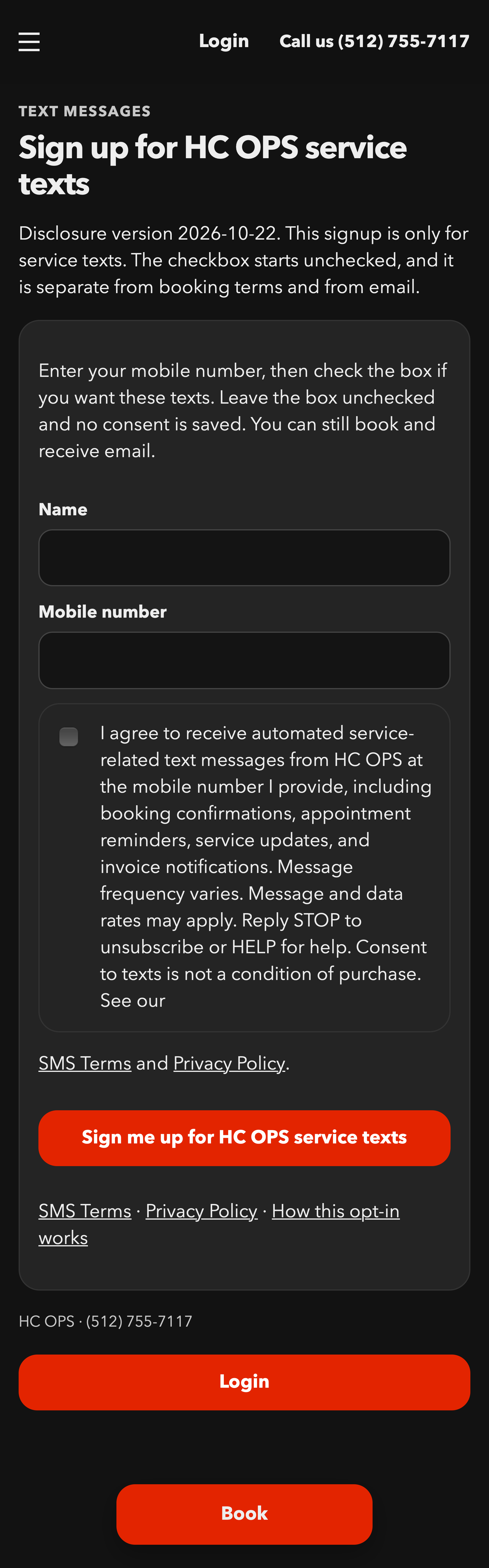
- To consent, check the box. It names the service messages, says message frequency varies, says message and data rates may apply, and says to reply STOP or HELP. SMS Terms and Privacy Policy are links to the SMS terms and the privacy policy.
- Submit “Sign me up for HC OPS service texts.” The server stores that mobile number, the time, the source public form, the disclosure version, and the disclosure text. Office staff can also record a verbal, written, or self-service request the customer made.
The live form
This screenshot is the deployed public form with empty fields. The disclosure and the policy links are visible. No customer name or number is shown.